 Senior Product Designer
Test the alert workflow while it can change.
I led design for CommandCentral Notify from early concepts through release. I put proposals in front of public-safety customers while the team could still change how operators would prepare and send an alert.
- My role
- Led design through release
- Who tested
- Public-safety customers
- Delivery
- Text, voice and email
An alert has to reach the right people.
CommandCentral Notify supports public-safety teams sending urgent information to a community. The product needed to connect three separate decisions: who should receive an alert, which channels should carry it and what they need to know. A usable workflow has to make those choices understandable when people have little time to work through them.
I led the design process and set its direction, working with design, engineering and business partners. My job was to turn the requirements into a workflow the team could put in front of the people who would use it. We used story mapping to work through the requirements and combined desk research, personas and competitive analysis to prepare the first concepts.
Show the concept before it hardens.
We took early concepts to public-safety customers before committing to the interface. It gave us a way to ask about the workflow while there were still alternatives: where operators expected to define a scenario, what they needed to see while preparing the alert, and which parts should already be set up before an event.
Concept
Customer walkthroughs
Where would operators set up an alert scenario in their own workflow?
Controls
Remote usability tests and card sorting
Can operators find the controls, and where do they expect related options to live?
Revision
Return to customers
Does the revised workflow make sense in their setting before release?
The leadership decision was when to invite people in. Early concepts let the team change the structure. Once development was implementing the flow, changes had a different cost. Returning to customers before release gave us a chance to see the work again with the people who understood the setting.
Prepare the scenario before the incident.
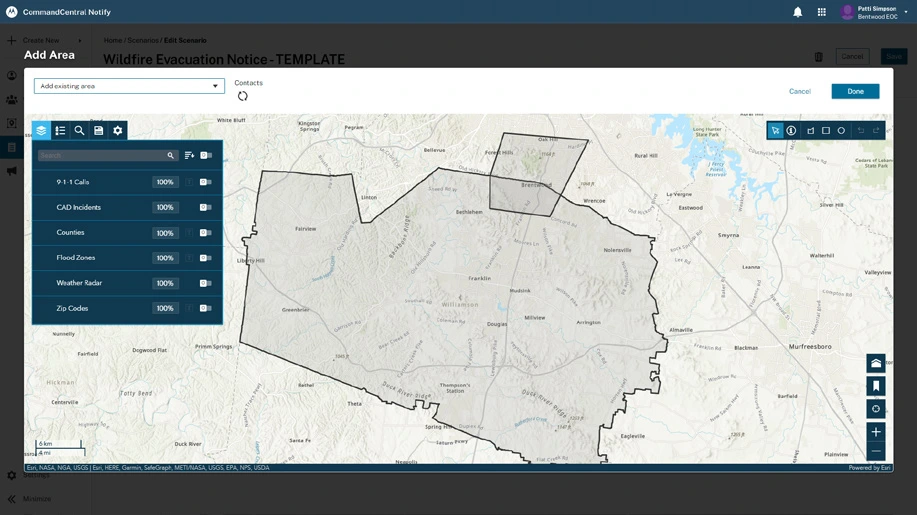
A feature in the released product makes the design problem easier to see. Operators can prepare and save a scenario for later use. For example, an evacuation template can start with an area already defined. At the moment of use, the operator can see who the alert is intended to reach and review the prepared information before acting.
Choose recipients
- Recipients
- Evacuation area
- Channels
- Still to choose
- Message
- Still to review
Start with the area the notification needs to cover. A saved scenario can already carry that area.
Check channels
- Recipients
- Evacuation area
- Channels
- Text, voice and email
- Message
- Still to review
Check how the people in that area will receive the alert.
Review the scenario
- Recipients
- Evacuation area
- Channels
- Text, voice and email
- Message
- Evacuation instructions
Review recipients, channels and message together. This example shows preparation before sending.
The public workflow also shows why the recipient decision and the channel decision belong apart. An area or a group describes whom an operator intends to reach. Text, voice and email describe how the alert goes out. A person reviewing a scenario needs to be able to check each part on its own.
Learn the context the tool operates in.
I completed FEMA Independent Study course IS-00251.a, Integrated Public Alert and Warning System (IPAWS) for Alerting Administrators, in April 2021. It gave me a way to study the alerting context alongside the product work.
The released product provides an example of the kind of workflow we worked on. Our project record establishes the design sequence and the methods we used. It does not give a measured change in alerting speed or identify one test result as the reason for any particular released control.